



r2.04 – Our Biggest Release Yet
K.S. Bhaskar
Although it has been over a year since we released r2.02, we have not been idle. Unlike Santa’s elves, who must be ready in time for Christmas no matter what, r2.02 was such a robust release that we had the luxury of taking our time to get things into r2.04 that we wanted to. We couldn’t get everything in – in the software world, there is always something that has to be deferred – but we believe r2.04 was worth the wait.
We originally intended r2.04 to focus on performance, and it does. We blogged about critical section performance in Critical Section Performance in r2.04. But performance took on a life of its own, and we did so much more. Every release adds functionality, and the major functionality added in r2.04 is the ability to convert between M and JSON. And, as with performance, there is so much more in the release than that. You can read the draft release notes and see the development details. With everything in it, r2.04 is our biggest release yet, reminiscent of the Antonov An-225 Mriya above, which at 253 metric tons had the largest carrying capacity of any aircraft ever built.
Performance
In addition to the critical section performance enhancement, performance related enhancements in r2.04 include:
- Faster object code using the naked reference template – the compiler automatically detects places where it can use the faster object code template for naked references, including code where the M language does not support naked references.
- Garbage collection with no sorting – sorting consumes a major part of the time spent in garbage collection; eliminating it allows applications to run faster, while using more memory. In r2.04, an application can choose between speed and memory.
- Faster runtime code for both inside and outside critical sections – in addition to critical section performance, r2.04 includes many other optimizations.
- A JOB command that is as much as five times faster – applications that JOB processes to handle incoming TCP connections should benefit from this.
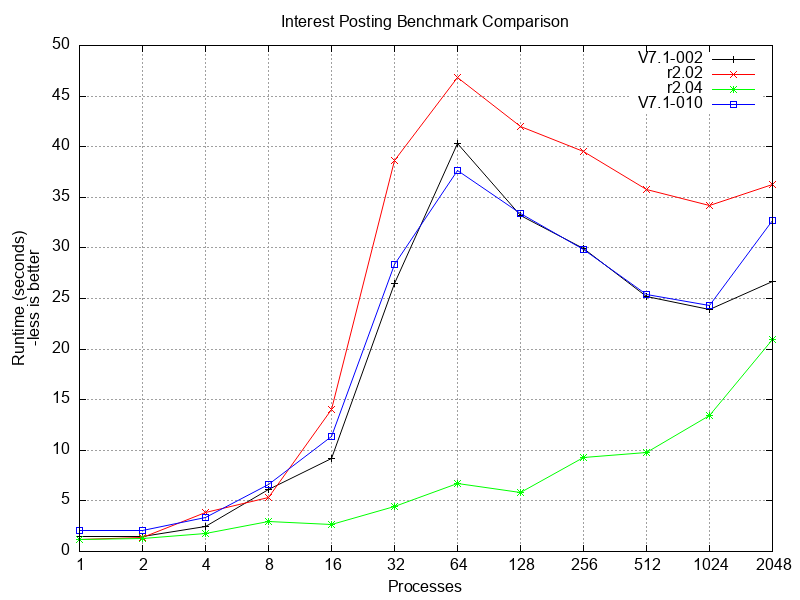
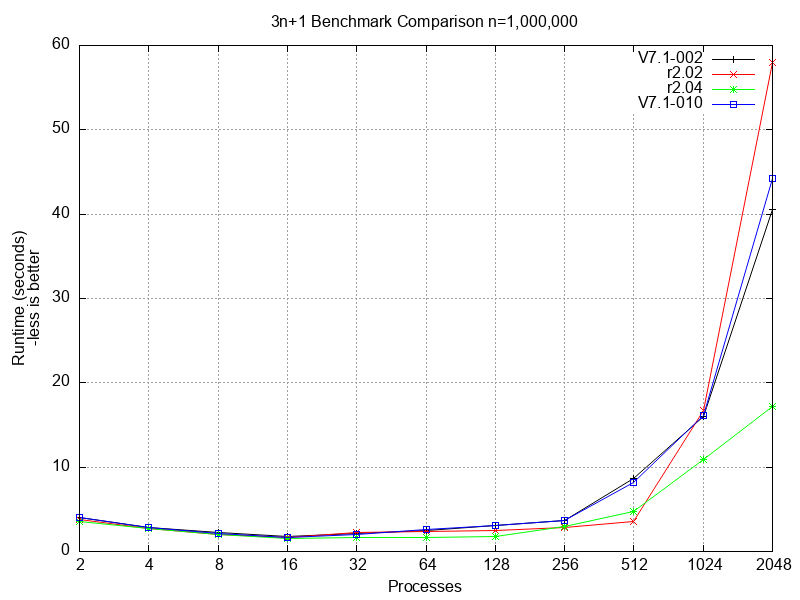
Below are two graphs to demonstrate the performance improvements in r2.04. The benchmarks were run on a Red Hat Enterprise Linux 10 system using the default garbage collection, i.e, with sorting. In our testing, we did not observe any material difference in performance between ext4 and xfs filesystems.
The benchmarks compare performance on the following YottaDB releases and GT.M versions:
- YottaDB r2.02, our previous release.
- GT.M V7.1-002, which has been merged into r2.04.
- GT.M V7.1-010, the latest GT.M version as of the r2.04 release. Although V7.1-010 is not merged into r2.04, you can compare the performance of r2.04 against V7.1-010.
- YottaDB r2.04.
In both cases, the y axis is runtime in seconds, i.e., less is better.
The first benchmark simulates interest posting on accounts by a real-time core-banking application.
The second benchmark uses cooperating concurrent processes to calculate the lengths of 3n+1 sequences for integers from 2 through one million.
Observations
- Both benchmarks show that GT.M V7.1-002 and V7.1-010 perform comparably.
- Both benchmarks show that with large numbers of processes, many times the number of CPUs, both GT.M versions scale better than YottaDB r2.02, i.e., GT.M V7.1-002 has improved scalability compared to V7.0-005, the GT.M version merged into YottaDB r2.02.
- The interest posting benchmark clearly shows YottaDB r2.04 outperforming r2.02 and both GT.M versions.
- The 3n+1 benchmark shows r2.04 outperforming both GT.M versions at all loads, and at the high end scaling up better than GT.M versions and r2.02 (i.e., having a lower slope).
Even as they highlight the performance of r2.04, the graphs illustrate an important fact about benchmarking: performance characteristics can vary widely between workloads.
Functionality
The most significant functional enhancement in r2.04 is the ability to export (encode / serialize / stringify) [sub]trees as JSON and to import (decode / deserialize / parse) JSON strings into [sub]trees. Since [sub]trees can have values at their roots as well as their own [sub]trees, which JSON does not support, the encoding format allows for such M [sub]trees (i.e., with a $DATA of 11) to be encoded and for the JSON to be re-decoded flawlessly, without any data loss. There are both C and M APIs (see example below); JSON parsing is done using the Jansson library. There are numerous additional enhancements to functionality, including:
- ZSHOW “V” able to display variables at a specific stack level – the ability to examine variable values obscured by called stack frames makes for easier debugging.
- For processes started with a JOB command, $ZYJOBPARENT has pid of parent process – there is no longer a need to explicitly pass this as a parameter when using the JOB command, or for a child process to look in the /proc filesystem.
- SET $ZROUTINES supports globbing of shared library filenames – simplifies application code that needs to include a number of shared libraries, e.g., plugins, in $ZROUTINES.
- Warning if a variable appears more than once in a NEW – catches inadvertent application programming errors.
- GT.M versions V7.1-000, V7.1-001, and V7.1-002 are merged into r2.04.
Fixes
Every YottaDB release must pass all the tests of predecessor YottaDB releases and more. We find and fix bugs and misfeatures, for example:
- WRITE /TLS does not set $TEST if no TIMEOUT was specified.
- Appropriate permissions for $ydb_tmp and, where appropriate, parent directory.
Since the upstream GT.M team only releases the source code for each version, but not the automated tests, we create our own automated tests when merging a GT.M version into YottaDB. During the process, we find and fix GT.M bugs and misfeatures, for example:
- MUPIP RUNDOWN runs down database files even when replication instance files do not exist.
- In Kubernetes pods, Source Server connects reliably with Receiver Server.
Note that the titles of issues describing fixes to bugs and misfeatures reflect the correct behavior after we fix the issues, and not issues as originally reported (since a fix may only be indirectly connected with original symptoms reported).
JSON Example
Here is an example of decoding a 29MB JSON string into a global variable, and encoding the global variable back into JSON.
YDB>set jsonfile=$zsearch("work/github/test-data/large-file.json") open jsonfile:readonly

YDB>use jsonfile for i=1:1 read line quit:$zeof  set json(i)=line

YDB>use $principal close jsonfile set json=$order(json(""),-1) write json
11356
YDB>set begin=$zut zydecode ^m=json set end=$zut write $fnumber(end-begin/1000,",")," msec"
553.165 msec
YDB>set begin=$zut zyencode jsonout=^m set end=$zut write $fnumber(end-begin/1000,",")," msec"
847.974 msec
YDB>
The above was executed on a laptop with an Intel i7-1260P CPU.
In Conclusion
Sorry to keep you waiting, but all good things take time. YottaDB r2.04 will land imminently, and we look forward to hearing from you as you use it.
Credits
- Photograph of Antonov An-225 Mriya coming in to land used under the Creative Commons Attribution-Share Alike 3.0 Unported license.
- Photograph of MSC Loreto used under the Creative Commons Attribution-Share Alike 4.0 International license.
Published on March 29, 2026